For optimal reading, please switch to desktop mode.
You'll have heard the news: GPUs are in high demand. At StackHPC, we value allowing our customers to choose the hardware that works best for them, and that includes avoiding vendor lock-in wherever possible. Nvidia dominates but this is a fast-developing market, and here we'll explore how we've been bringing our support for AMD GPUs in line.
Integrating with OpenStack
In our StackHPC Kayobe-Config, we have support for automatically configuring hypervisors for PCI Passthrough of GPUs. To configure AMD MI210s, you'd simply need to extend the following configuration in stackhpc-compute.yml:
gpu_group_map:
  hypervisor-gpu-mi210:
    - mi210

stackhpc_gpu_data:
  ...<previous device configs>
  # AMD MI210
  mi210:
    resource_name: "{{ mi210_resource_name | default('mi210') }}"
    vendor_id: "1002"
    product_id: "740f"
    device_type: "type-PF
This then configures Nova to add an alias for passing through the GPU. nova.conf:
[pci]
device_spec = { "vendor_id":"1002", "product_id":"740f" }
alias = { "vendor_id":"1002", "product_id":"740f", "device_type":"type-PF", "name":"mi210" }
PCI Passthrough isn't playing ball
We used this support to configure PCI Passthrough of some AMD MI210s at a client site. Initially it seemed to work great, we deployed VMs onto these hypervisors and the MI210s were showing up and ready to use. But then we wanted to test using a different operating system, so we deleted the VM and suddenly:
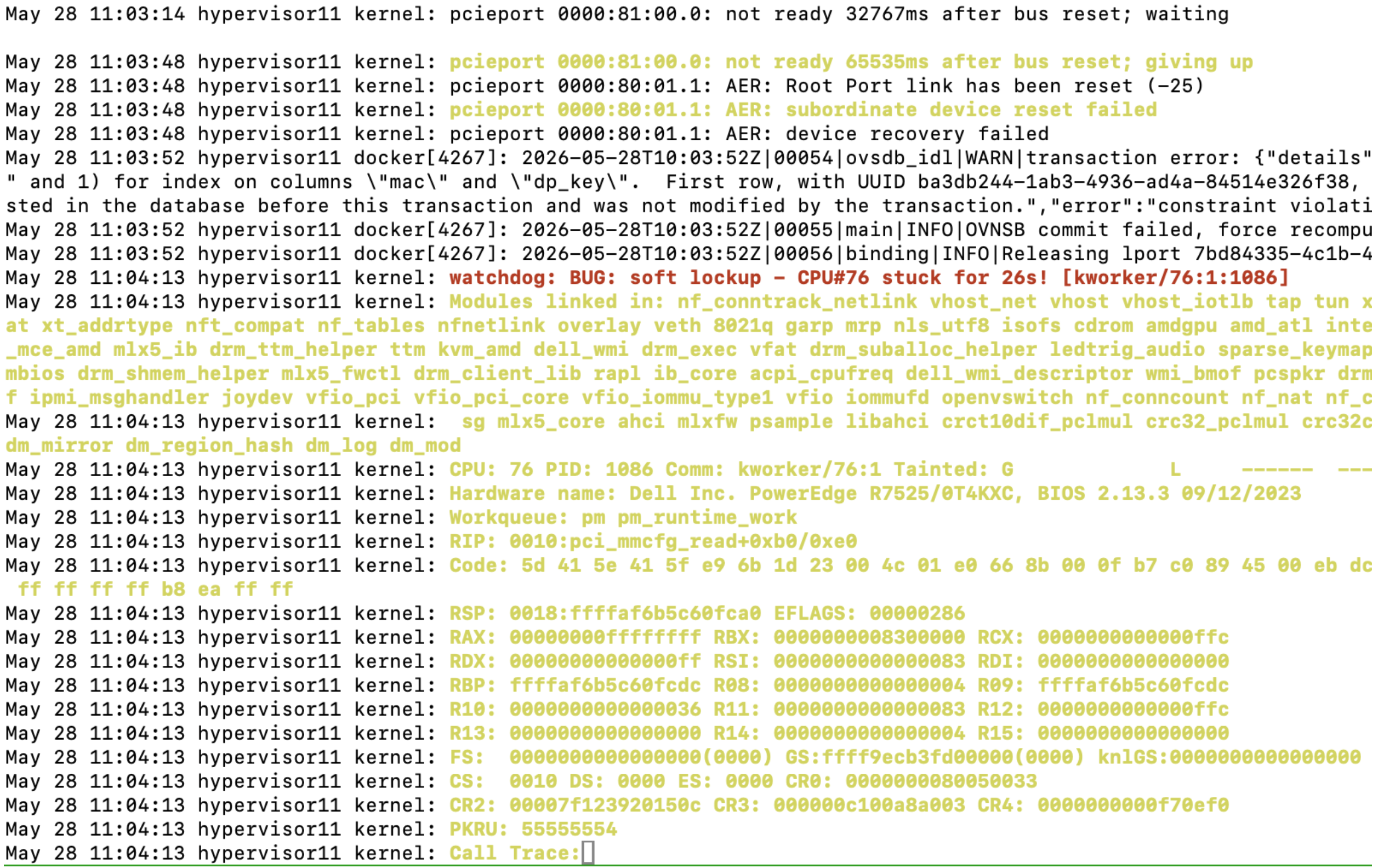
Oops, the whole hypervisor crashed. Libvirt logs said Unknown PCI header type '127' for device '0000:82:00.0'. In this context 127 (1111111 in binary) means a failed PCIe bus read: the GPU wasn't resetting itself correctly. Journal logs showed the kernel gets stuck waiting for the PCIe port to become ready after reset, before locking up as the hypervisor then crashes. This looked to be some issue with these specific GPUs, as we hadn't seen the same at other sites. We tried updating to the latest GPU firmware, latest drivers, and the latest OS kernel; all to no avail. Without any more avenues to pursue, this called for a workaround.
AMD MI210s have limited SR-IOV support, with just one single virtual function. Normally this wouldn't be particularly useful for us, as this would still only let one VM use a given GPU at a time. But importantly, this lets us give VMs access to the GPU without handing over the underlying PCI device to libvirt. The hypothesis is that we can avoid the host lockups by never needing to reset the GPU after use. Rolling this out via Kayobe was simple, it just involved changing product_id and device_type in stackhpc-compute.yml:
stackhpc_gpu_data:
  ...<previous device configs>
  # AMD MI210
  mi210:
    resource_name: "{{ mi210_resource_name | default('mi210') }}"
    vendor_id: "1002"
-   product_id: "740f"
-   device_type: "type-PF"
+   product_id: "7410"
+   device_type: "type-VF"
So in nova.conf we get:
[pci]
device_spec = { "vendor_id":"1002", "product_id":"7410" }
alias = { "vendor_id":"1002", "product_id":"7410", "device_type":"type-VF", "name":"mi210" }
After applying these changes the creation and deletion of VMs is performing as expected. We were free to continue scheduling more GPU-enabled VMs.
What was this work for?
We have been working to integrate AMD GPUs into our Kubenetes offering in Azimuth. AMD provides a GPU operator for Kubernetes that automates host kernel driver management and mounts the necessary kernel device paths into pods requesting GPUs. Azimuth provisioned Kubernetes platforms now have the option to include this operator as an addon in our ClusterAPI clusters.
The standard configuration of the AMD GPU Operator uses Kernel Module Management to build the driver modules required for the detected host kernel and publish them to an image registry to be pulled and loaded into the kernel. For our self-service model, however, we wanted users to be able to create Kubernetes platforms without the need to provide their own image registries per-cluster or require trust in a shared registry per Azimuth deployment where multiple tenants would have write access. So we instead opted to build AMD GPU DKMS packages into our Kubernetes images distributed with Azimuth and configure the GPU operator to pass through these in-box drivers. Thankfully, the upstream Kubernetes CAPI image builder already provides support for building images with AMD GPU drivers installed, so this just required config tweaks in our existing image build process.
The next step was to integrate the hardware with our JupyterHub platform which we allow users to self-service on top of Kubernetes clusters. This involved building new container images for it including user-space ROCm drivers and creating a custom AMD GPU profile for it.
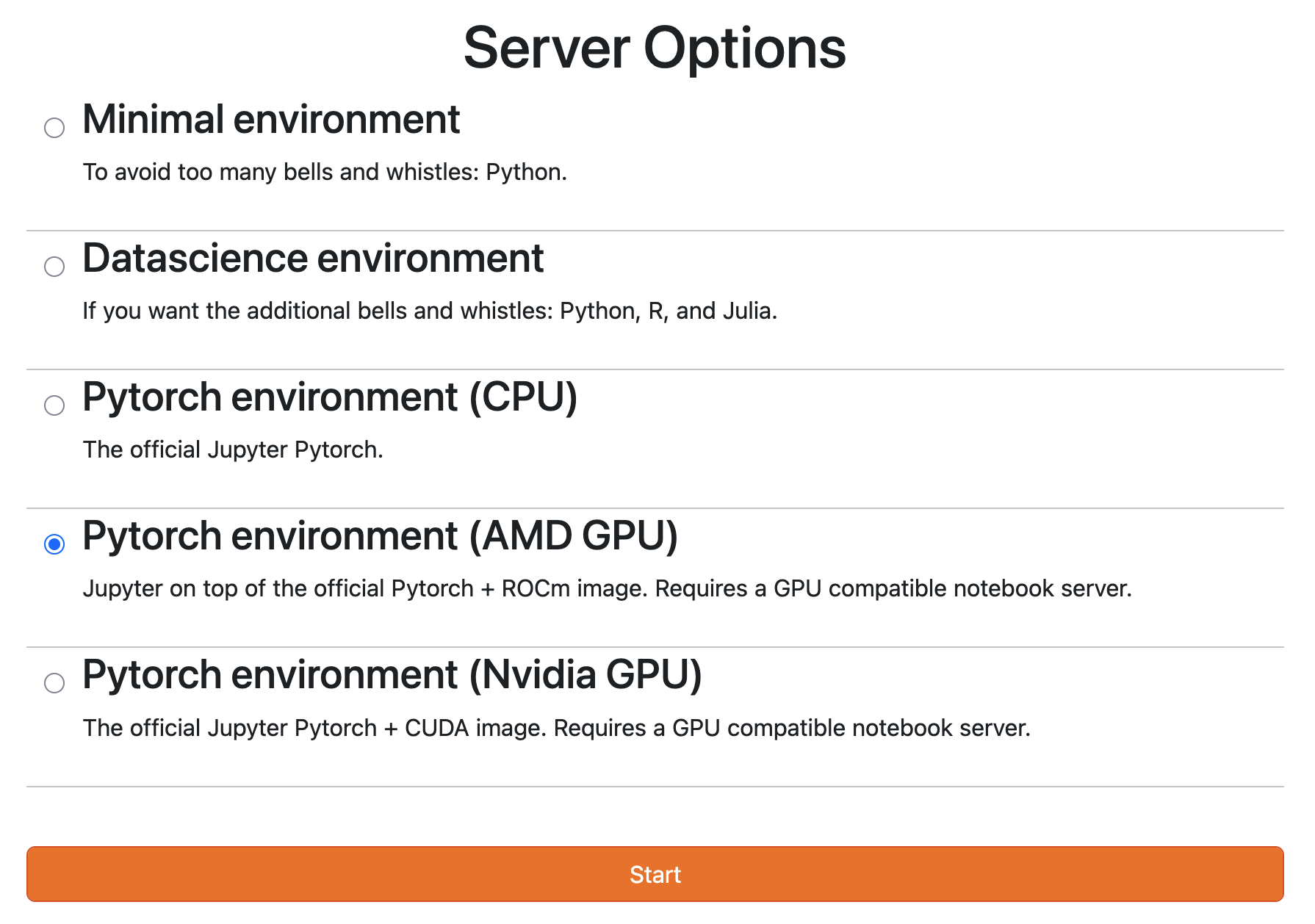
The environment is enabled automatically by looking up which GPU-specific Node Feature Discovery labels are present on the cluster. So all you need is a worker in your cluster with any AMD GPU attached and the environment will appear, ready for immediate use.
Try it yourself
Support for this is available now. Check out the 2026.8 release of Azimuth. This includes the latest Azimuth charts, so you can try out the AMD JupyterHub profile today.
MI210s don't support any partitioning, so the whole GPU needed to be allocated to a single VM. This was acceptable for our client's target platform, but might not be for you. Fret not! Newer AMD Instinct GPUs do support spacial partitioning, and StackHPC's Kayobe-Config has support for automatically configuring vGPUs too.
Get in touch
If you would like to get in touch we would love to hear from you. Reach out to us via LinkedIn, Bluesky or directly via our contact page.